Business workspace

Sales

Sample dataSample businessSigned in as: Demo visitor · Demo
DVDemo visitorDemo
DEMO · SAMPLE DATA

Try Businar.

Start free

Real screens, sample data. No real transactions; reloading resets the demo.

  1. Add a product
  2. Save the sale
  3. See the result

Manual sales and customer accounts are free. Barcode catalog and stock management are in Pro.

Demo scope and tips
  • Add an item and save the sale. For a credit sale, select Sample customer; see the balance in Accounts and collections.
  • The sample customer starts with a TRY 1,500.00 balance. Try a collection; no real payment is received.
  • Reports, product editing and bulk import are outside this demo. Sample data does not transfer to your account.
DAILY CASH DESK

Quick sale

Try sample barcodes · Pro

To scan with the camera, print a barcode or open it on another device; you cannot scan the same phone’s screen. Camera scanning requires a supported device and camera permission. You can also use an external reader or type the code.

The demo catalog contains only these three sample products. It cannot find another product’s real barcode. “Fill code” enters the code; it does not scan it.
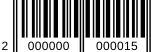
CoffeeTRY 85.00
Coffee: 20000000000152000000000015
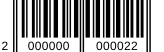
WaterTRY 15.00
Water: 20000000000222000000000022
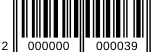
NotebookTRY 60.00
Notebook: 20000000000392000000000039
Product or barcode
USB · Bluetooth · Wi-Fi keyboard mode
Connect a reader or camera
  • USB / Bluetooth / Wi-Fi: Connect the reader to your computer, phone or tablet. Choose HID/keyboard output that types the code. Focus the code field and scan, then check the code on screen.
  • In sales, enable external reader mode. Enter or Tab adds the code to the cart; if your reader sends no suffix, press + Add. Saving the sale still requires your confirmation.
  • Camera: Use your computer’s built-in/USB camera or your phone/tablet camera. Allow camera access and choose a camera if several are available. Show the whole barcode in good light. Images are processed on your device.
  • A Wi-Fi reader must send its code to this device as keyboard input. IP/TCP-only or proprietary models need the manufacturer’s connection software; network devices are not discovered automatically.
CartAdd products
TRY 0.000/50
Add a note, due date or discount explanation Optional
Add customer Optional
Sales customerThis demo only searches the sample customer; it does not access real customer records.
Optional
Today’s turnoverTRY 0.00Sample data
Completed transactions0Sample data
Cancelled0Sample data